baton_mini_use_demo is a Baton Mini demo package. It currently provides two functional demos:
- odom_nav_demo : a ROS-only demo that combines Baton Mini pose data with wheel odometry for simple command-based navigation
- stereo_view_demo : a stereo image preview demo that is available in ROS1, ROS2, and non-ROS standalone builds
The project is not a full navigation stack. Its purpose is to provide reference examples that can be
built, launched, receive data, and demonstrate practical Baton Mini integration patterns.
1. What Is Included
1.1 Demo coverage
- baton_mini_odom_nav_demo
○ logs in to the device through SDK sources from ../baton_mini_sdk_demo
○ receives stream pose data and optional fast odom TCP data
○ subscribes to wheel odometry from wheel_odom_topic
○ collects wheel/Baton pose samples for planar extrinsic validation and estimation while
○ terminal-command motion is actually happening
○ validates a saved extrinsic prior or activates a newly converged control extrinsic
○ switches the preferred control pose source from wheel_odom to baton_base once a
○ usable control extrinsic is available
○ accepts terminal command sequences such as ahead 1m and ahead 2m then right 90deg then ahead 0.2m
○ publishes velocity commands to cmd_vel_topic
○ publishes the current control pose to odom_topic
○ writes CSV logs for pose, control, calibration, and velocity commands
- baton_mini_stereo_view_demo
○ logs in to the device
○ enables the stereo image stream directly
○ receives left/right grayscale images through dedicated TCP channels
○ displays a simple live stereo preview window
- baton_mini_stereo_view_demo_non_ros
○ reuses the same stereo preview logic without ROS
○ supports parameter overrides through command-line arguments such as server_ip:=192.168.1.10 or –server_ip=192.168.1.10
1.2 Code structure
The project separates demo logic from environment adaptation:
- ROS_IO : shared wrapper for parameters, logging, timing, and ROS or non-ROS runtime adaptation
- BatonMiniSimpleController : main odom-nav controllerBatonMiniStereoViewDemo : shared stereo preview implementation for ROS and non-ROS modes
- PoseTracker : selects the active control pose source between wheel_odom and baton_base
- ExtrinsicCalibrator : online planar extrinsic estimator
- CommandPlanExecutor : terminal command sequence executor
- TerminalCommandParser : parser for ahead/back/left/right commands
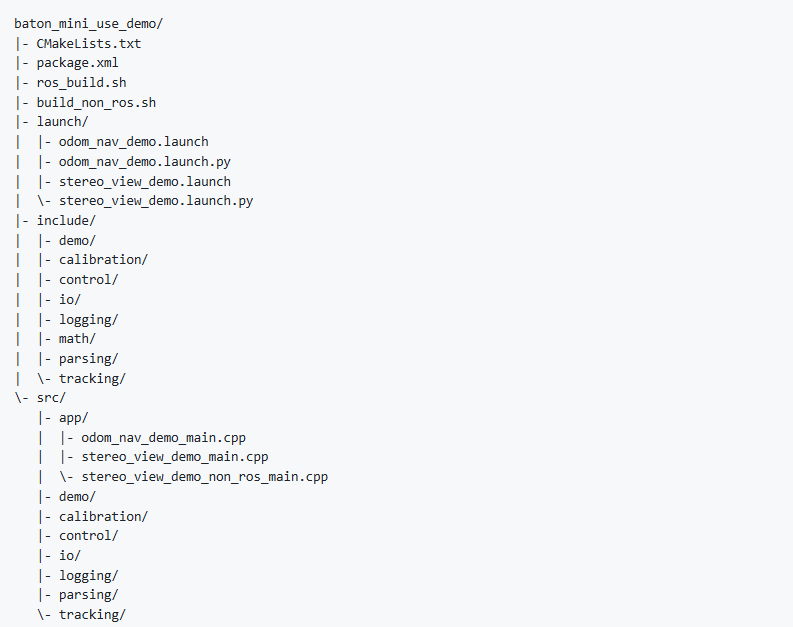
2. Repository Layout
3. Requirements
3.1 Common requirements
- Linux
- OpenCV
- a sibling directory named ../baton_mini_sdk_demo
Linux is required because the code directly uses:
- socket / ioctl / arpa/inet.h
- /dev/tty
- the ip command to configure a local IPv4 address when needed
3.2 ROS build requirements
ROS is required only for ROS builds:
ROS1: roscpp , nav_msgs , geometry_msgs , std_msgs
ROS2: rclcpp , nav_msgs , geometry_msgs , std_msgs
ROS2 launch runtime also needs launch and launch_ros
3.3 SDK source dependency model
CMakeLists.txt does not link a prebuilt Baton Mini SDK library. Instead, it directly compiles SDK
sources from ../baton_mini_sdk_demo/src/… into the demo executables. Because of that:
- baton_mini_sdk_demo must exist as a sibling directory
- this project cannot be built if that sibling directory is missing
4. Build
4.1 ROS build script
Before running ros_build.sh , source the corresponding ROS environment first. The script detects
ROS1 or ROS2 from ROS_VERSION automatically and only builds the baton_mini_use_demo
package.
ROS1:

ROS2:

Internally, the script runs:
- ROS1: catkin_make –pkg baton_mini_use_demo –cmake-args -DUSE_ROS=ON
- ROS2: colcon build –packages-select baton_mini_use_demo –cmake-args -DUSE_ROS=ON
4.2 Manual ROS1 build

4.3 Manual ROS2 build

4.4 Non-ROS stereo-view build

The executable is generated at:

4.5 Build notes
- ros_build.sh is intended for ROS builds and auto-detects ROS1 / ROS2
- ROS builds generate baton_mini_odom_nav_demo and baton_mini_stereo_view_demo
- non-ROS builds generate baton_mini_stereo_view_demo_non_ros only
- odom_nav_demo is intentionally not provided in non-ROS mode
- build_non_ros.sh internally runs cmake .. -DUSE_ROS=OFF
- when USE_ROS=ON and ROS_VERSION=2 , CMake uses the ROS2 path; otherwise it uses the ROS1 path
5. Run
5.1 Odom-nav demo
ROS1:

ROS2:

5.2 Stereo-view demo
ROS1:

Custom window size example:

ROS2:

Non-ROS:

Custom window size example:

Headless example:

The non-ROS executable also accepts –key=value style overrides, for example:

6. Inputs and Outputs
6.1 Odom-nav demo
Inputs:
- Baton Mini stream pose data
- optional fast odom TCP data
- wheel odometry from wheel_odom_topic
- terminal text commands
Outputs:
- cmd_vel_topic : chassis velocity commands
- odom_topic : current controller pose output
- console logs
- CSV log files
- saved extrinsic prior file
6.2 Stereo-view demo
Inputs:
- left image TCP data
- right image TCP data
Outputs:
- a live preview window that shows left/right images side by side
- console logs about SDK login, state transitions, and frame reception
7. Main Parameters
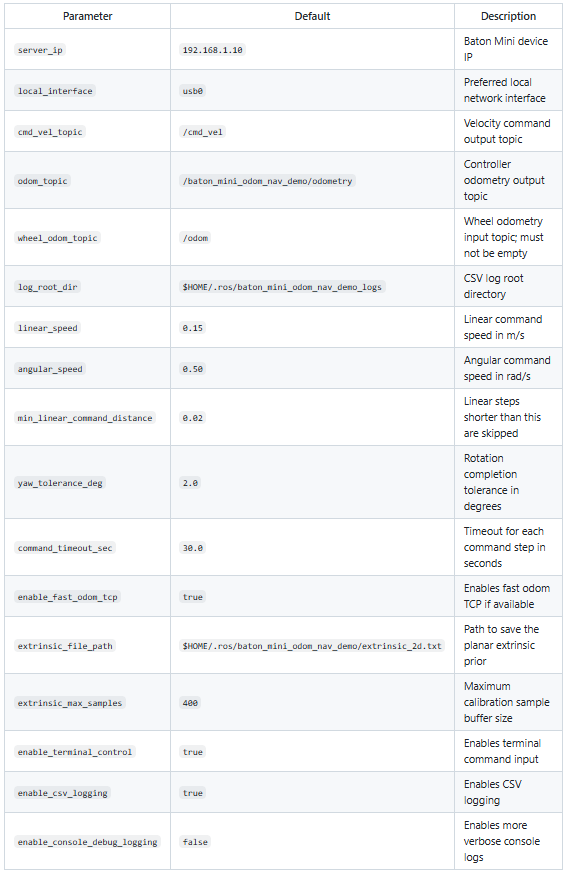
7.1 Odom-nav launch parameters
The following parameters are exposed by both launch/odom_nav_demo.launch and
launch/odom_nav_demo.launch.py :
7.2 Stereo-view parameters
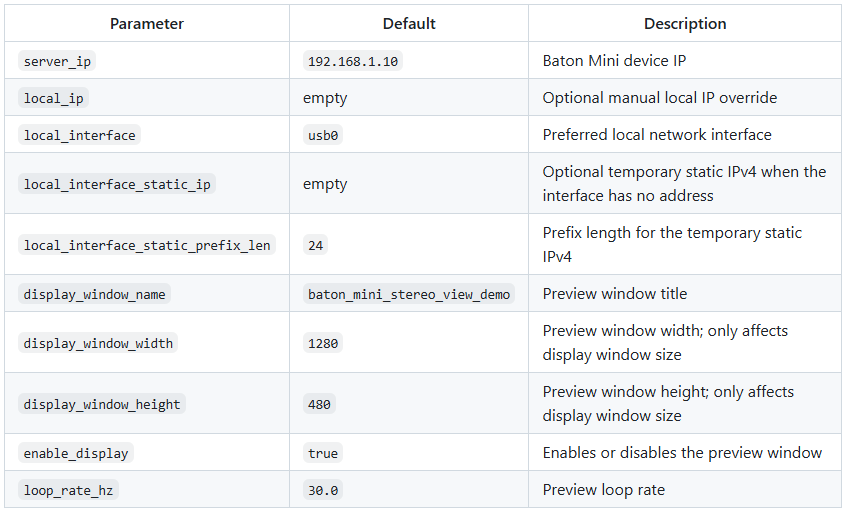
The following parameters are exposed by both launch/stereo_view_demo.launch and
launch/stereo_view_demo.launch.py . The same names can also be passed to the non-ROS
executable through command-line overrides.
8. Runtime Notes
8.1 Odom-nav behavior
- the controller starts with wheel_odom as the preferred control pose source
- after a saved prior is validated or a new extrinsic becomes stable enough, the controller freezes a control extrinsic and switches to baton_base
- control-extrinsic activation or replacement is deferred while a terminal command is still executing
8.2 fast odom behavior
When enable_fast_odom_tcp=true , the controller:
- sends an SDK request to enable fast odom
- starts an internal TCP receiver thread
- retries the request until fast odom data is received
The fast odom TCP port is fixed to 9994 , and the SDK command/login port is fixed to 8000 . They
are not currently exposed as launch parameters.
8.3 Stereo-view behavior
- after login, the demo starts left/right TCP receivers directly and requests opening the stereo image stream
- before the code receives its first image frame, it retries the stereo image enable command at a fixed interval; once image stream data is received, it stops sending repeated requests
- the stereo-view demo no longer contains logic to auto-start the stereo3 algorithm
- display_window_width and display_window_height only control the OpenCV preview window size and do not change the device image resolution
- in headless environments, set enable_display=false to keep receiving and logging without creating a GUI window
9. Main Source Entry Points
- src/app/odom_nav_demo_main.cpp : ROS odom-nav entry
- src/app/stereo_view_demo_main.cpp : ROS stereo-view entry
- src/app/stereo_view_demo_non_ros_main.cpp : non-ROS stereo-view entry
- src/demo/baton_mini_stereo_view_demo.cpp : shared stereo preview logic
- src/control/baton_mini_simple_controller.cpp : main odom-nav controller
- src/io/ros_interface.cpp : ROS and non-ROS runtime abstraction
- src/tracking/pose_tracker.cpp : control pose source selection
- src/calibration/extrinsic_calibrator.cpp : planar extrinsic estimation
- src/control/command_plan_executor.cpp : terminal command executor
- src/parsing/terminal_command_parser.cpp : terminal command parser
10. Notes
- this is a usage demo, not a full navigation system
- the current extrinsic model is planar 2D only
- online calibration sample collection depends on actual terminal-command motion
- wheel_odom_topic must not be empty, or odom-nav initialization fails
- if terminal input is not needed, set enable_terminal_control=false
- if CSV output is not needed, set enable_csv_logging=false